

Pega Constellation Chronicles
What is the method to pass a case-level attribute as an input parameter to the source of a page list field (such as a dropdown or radio buttons) in order to conditionally display options?
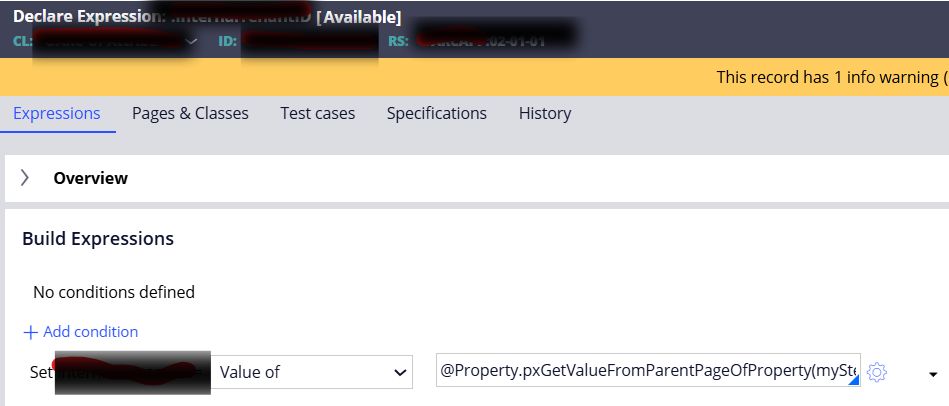
Step 1: Create a Calculated Field (Declare an Expression)
First, create a calculated field in your data class. This calculated field will act as the base for implementing your conditional logic.
Step 2: Set the Calculated Value
Define the expression for the calculated field using the following function to retrieve the required case-level value:
@Property.pxGetValueFromParentPageOfProperty(myStepPage, "Work class property")
This expression helps fetch the value from the parent (case) page.
Step 3: Use the Calculated Field
Use this calculated field as an input parameter in the data source of your dropdown or radio button field. The data page can then use this parameter to filter or control which options are displayed.
Step 4: Edit View Metadata Attribute
Open the View rule that contains the table or field. Remove
"deferDatasource": true
from both the view metadata and the context metadata for the dropdown or radio button field. This ensures the data source evaluates correctly at runtime.
To view the metadata of the view, make sure the
pxEnableC11nDev
flag is enabled when the rule condition evaluates to true.
By following these steps, you can create a more intuitive interface that responds to user inputs effectively!